Showing posts with label Assignment 3. Show all posts
Showing posts with label Assignment 3. Show all posts
Monday, 10 June 2013

Friday, 7 June 2013
Assignment 3 task 3 Post production
Organising the bin-
As we captured footage we separated it into two sections Untitled 11 and untitled 12 which contained the 1st and 2nd halves of our advert respectively. We split this up do there wasn't as much footage to go though at a time as we edited, editing together just the 1st half instead of looking all though the footage to get a take for the first half.


Range of editing tools
As i constructed my advert I used two editing tools to get the best out of it, such being; "Bad TV" and overlaying scrolling text and shapes. By manipulating a rectangle I created in final cut pro I managed to create a relatively professional looking news Headline bar at the bottom of the advert, once combined with the scrolling Text, Of which I created in Live Type and overlayed on the bar and making minor adjustments to the size of the bar and text size and font. Using "Bad TV" on some sections of the advert to provide transitions and to cut up the action emphasised the erraticness and chaos of the situation as the zombie attacks.
Additionally i imported a image from Google by saving it onto the mac and dragging it into the bin and then onto the time line, of which I also overlayed text onto and made smaller and larger on the time line to adjust how long I wanted it to show at the end of the advert.


Exporting the film using the correct format settings
To Export The finished advert I used the steps shown in the first picture which comprise of selecting export in the file menu and then "using QuickTime Conversion" Then selection the MPEG-4 Format and MPEG-4 Improved video format on the next section and a resolution of 1280 x 720. Upon confirming these settings the advert is saved on the mac under the settings desired.


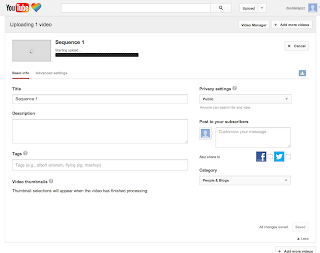
I chose YouTube to host my advert as it is used by many people and a large amount of users of the site fit my advert demographic. To upload my advert to YouTube i prosseded to sign in then click the upload button on the top left and chose the file of the advert and after the file is uploaded I title and add a description to the advert and save compleating the uploading proccess making the advert viewable to the general masses allowing constructive criticism and comments on the finished product.


As we captured footage we separated it into two sections Untitled 11 and untitled 12 which contained the 1st and 2nd halves of our advert respectively. We split this up do there wasn't as much footage to go though at a time as we edited, editing together just the 1st half instead of looking all though the footage to get a take for the first half.


Range of editing tools
As i constructed my advert I used two editing tools to get the best out of it, such being; "Bad TV" and overlaying scrolling text and shapes. By manipulating a rectangle I created in final cut pro I managed to create a relatively professional looking news Headline bar at the bottom of the advert, once combined with the scrolling Text, Of which I created in Live Type and overlayed on the bar and making minor adjustments to the size of the bar and text size and font. Using "Bad TV" on some sections of the advert to provide transitions and to cut up the action emphasised the erraticness and chaos of the situation as the zombie attacks.
Additionally i imported a image from Google by saving it onto the mac and dragging it into the bin and then onto the time line, of which I also overlayed text onto and made smaller and larger on the time line to adjust how long I wanted it to show at the end of the advert.


Uploading
Exporting the film using the correct format settings
To Export The finished advert I used the steps shown in the first picture which comprise of selecting export in the file menu and then "using QuickTime Conversion" Then selection the MPEG-4 Format and MPEG-4 Improved video format on the next section and a resolution of 1280 x 720. Upon confirming these settings the advert is saved on the mac under the settings desired.


Uploading to YouTube
Making the advert accessible
I chose YouTube to host my advert as it is used by many people and a large amount of users of the site fit my advert demographic. To upload my advert to YouTube i prosseded to sign in then click the upload button on the top left and chose the file of the advert and after the file is uploaded I title and add a description to the advert and save compleating the uploading proccess making the advert viewable to the general masses allowing constructive criticism and comments on the finished product.


Tuesday, 4 June 2013
Assignment 3 task 2 Production
Upon collecting the equipment provided by the school and signing it out we proceeded to make our way on site to our filming location and proceeded to check the hazards of the location while we set up the equipment. After deciding all applicable hazards of the site where safe and the crew and cast understood what and where they were, we proceeded to move into positions to take the first few shots.
By making sure we filmed at midday on a sunny day with a clear sky we didn't need to worry about lighting as it was consistent throughout the filming period.
When instructing the actors and crew members we gave them a rundown of the storyboard and how each person fit into it to give a general idea where everyone needed to be, we then prosseded to tell the actors to improvise for the first few takes to get a rough feel of where people needed to be and tweek how sections where performed minorly so the final advert ran fluidly. we then proseeded to inform the actors exactly where they needed to be and introduced signs so the actors knew when do a certain action i.e run in from the left and the zombie to start attacking.
By making sure we filmed at midday on a sunny day with a clear sky we didn't need to worry about lighting as it was consistent throughout the filming period.
When instructing the actors and crew members we gave them a rundown of the storyboard and how each person fit into it to give a general idea where everyone needed to be, we then prosseded to tell the actors to improvise for the first few takes to get a rough feel of where people needed to be and tweek how sections where performed minorly so the final advert ran fluidly. we then proseeded to inform the actors exactly where they needed to be and introduced signs so the actors knew when do a certain action i.e run in from the left and the zombie to start attacking.
Monday, 3 June 2013
Contingency Plan Assignment 3 task 1
Contingency Plan
Programme title: Purple box
Client: Rocksteady, Mojang, Capcom, Ubisoft, atari
Writer: Harry Smith
Producer: Sinister butterfly productions
Director: Harry Smith
Date: april 2013
Potential problems and how to overcome these problems
- Any unavailable crew will be covered by standby crew.
- All equipment are booked for a week incase shooting dates are changed due to weather or sections need to be reshot.
- If the camera breaks at any point a spare has been rented to replace.
- if we come across any problems or damage to equipment that needs replacing we have allocated a contingency fund of 10% of our total budget being £275.50.
Advert budget Assignment 3 task 1
Advert budget
equipment for 5 days tripod, camera + camera replacement, - £293
- Microphone- Sony UWP-C1/V1 wireless mic and receiver--£92
- Sony DCR-TRV480E -£80
- Fluid Tripod -£41
Costumes - Steve, Assassins creed, - £217.54
-Officially Licensed Minecraft 12" Steve Head Costume Cardboard Mask - £119
-Assassin's Creed EZIO Costume 2 II anime cosplay NEW - £98.54
editing 3 days (maximum)- £4
- 4-4 Pin Firewire Cable-£4
Total Production Budget - £514.54
Contingency funds (10%)- £51.45
Total budget with contingency-£565.99
Pre-production planning Assignment 3 task 1
Proposal for "the purple box"
Prepared by
Harry Smith
Sinister dimensions productions
21st May 2013
clients- Rocksteady, Mojang, Capcom, Ubisoft, atari
copyright © 2013
|
Proposal for "the purple box"
|
Sinister dimensions productions has currently planned a 30 seconds long advert suitable for TV broadcasting set in a fake news report format. this advert will be aimed at a audience of 15-21 year olds, and will give unique references to each game in the box set throughout.
This advert will feature two different locations a fake news station and on scene at a park in "Racoon city". The advert starts with the fake news report at the station with reports of chaos due to the release of a new game box "The purple box" which then brings the report to the park with the reporter there who randomly interviews characters from the games in the game box. this will then lead to cutting back to the news station where chaos will ensue and the station gets attacked by zombies which will lead to a blank screen and then information on the product. (how much it costs, what the box looks like, where it can be bought and the products website) The advert will be recorded with Sony DCR-TRV480E and the budget will be approximately £600. |
Risk Assessment Sheet Assignment 3 task 1
Risk Assessment Sheet
Client: Rocksteady, Mojang, Capcom, Ubisoft, atari
Writer: Harry Smith
Producer: Sinister butterfly productions
Director: Harry Smith
Date: april 2013
Major issues:
Filming location:
- Cable trip hazard from microphone cable
- uneven ground
- slipping in water puddles
- contamination of equipment from waste on set
Solutions:
- cleary mark out microphone the cable with hazard tape
- pre warn crew about hazard
- assess set for amount of water and if to much we will not film on that day
- cover equipment with plastic
Location Visit Sheet Assignment 3 task 1
Production Schedule - Location Visit Sheet
Client- Rocksteady, Mojang, Capcom, Ubisoft, atari
Writer- Harry Smith
Producer - Sinister butterfly productions
Director - Harry Smith
Date - april 2013
The Slack in The Chase- Fitting location being a flat field with a city background and various trees
this fits perfectly with the planned events in the advert such as a character attempting to cut down a tree and another hiding behind a bush
Health and Safety-
Uneven ground- need to make sure crew do not trip or fall
Potential filming problems-
No electrical supply- all equipment will have to rely on battery power thus recording time is limited
No access to lights- so advert will have to be recorded in sunny days
The crew need to be aware of walkers incase they get in shot by accident.
The Chase satellite view-


The Slack in The Chase- Fitting location being a flat field with a city background and various trees
this fits perfectly with the planned events in the advert such as a character attempting to cut down a tree and another hiding behind a bush
Health and Safety-
Uneven ground- need to make sure crew do not trip or fall
Potential filming problems-
No electrical supply- all equipment will have to rely on battery power thus recording time is limited
No access to lights- so advert will have to be recorded in sunny days
The crew need to be aware of walkers incase they get in shot by accident.
The Chase satellite view-

The Chase map view-

Subscribe to:
Posts (Atom)